
🔥 Introduction
In today’s digital world, data is everything. From small businesses to large enterprises, every organization depends on data to make decisions, track performance, and grow faster.
But here’s the problem…
Most people struggle to manage data effectively.
That’s where SQL Server becomes a game-changer.
In this SQL Server tutorial, you’ll learn how to manage, store, and retrieve data step by step — even if you’re a beginner. By the end, you’ll clearly understand how SQL Server works and why it’s one of the most in-demand skills today.
📌 What is SQL Server?
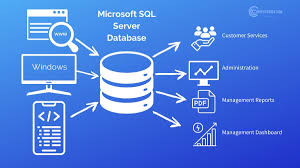
SQL Server is a relational database management system (RDBMS) developed by Microsoft. It is used to store and manage data in a structured way.
Instead of keeping data randomly, SQL Server organizes it into tables, making it easy to access and update.
🔑 Key Features:
- Secure data storage
- Fast data processing
- Easy data retrieval using queries
- Integration with applications
- Advanced reporting & analytics
👉 In simple words:
SQL Server helps businesses manage data efficiently and securely.
⚙️ How SQL Server Works
SQL Server works using a simple process:
- Data is stored in tables
- Users write SQL queries
- The server processes the request
- Results are displayed
🔹 Example:
SELECT Name FROM Employees;
👉 This command retrieves names from the Employees table.
🏗️ SQL Server Architecture Explained
Understanding architecture helps you build a strong foundation.
🧱 Main Components
1. Database Engine
The core component that stores and processes data.
2. SQL Server Agent
Used for scheduling tasks like backups and automation.
3. Reporting Services
Helps create reports and dashboards.
4. Integration Services
Used for data migration and transformation.
📊 SQL Server Tutorial: Basic Commands
🔹 1. SELECT
SELECT Name FROM Employees;
👉 This command shows the Name column from the Employees table.
🔹 2. INSERT
INSERT INTO Employees (Name) VALUES (‘Ruchi’);
👉 This command adds a new record with the name Ruchi.
🔹 3. UPDATE
UPDATE Employees SET Name=’Riya’ WHERE Name=’Ruchi’;
👉 This command changes the name from Ruchi to Riya.
🔹 4. DELETE
DELETE FROM Employees WHERE Name=’Riya’;
👉 This command deletes the record where the name is Riya.
🚀 Real-World Uses of SQL Server
SQL Server is widely used across industries:
💼 Business Applications:
- Customer data management
- Sales tracking systems
- Inventory management
- Financial reporting
- Data dashboards & analytics
👉 Example:
An e-commerce website uses SQL Server to manage orders, customers, and payments.
⚠️ Common SQL Server Issues & Solutions
🔹 1. Slow Performance
Sometimes SQL Server becomes slow and takes more time to run queries.
✔️ Solution:
Optimize your queries and use indexing to improve speed.
🔹 2. Connection Errors
Sometimes the system is unable to connect to the SQL Server.
✔️ Solution:
Check server settings and ensure proper configuration.
🔹 3. Data Loss
Data loss can happen due to accidental deletion or system failure.
✔️ Solution:
Always take regular backups to keep your data safe.
🔧 SQL Server Best Practices
To get the best results, follow these practices:
- Use indexing for faster queries
- Backup your data regularly
- Avoid duplicate data
- Write optimized SQL queries
- Monitor database performance
📊 Advanced SQL Server Concepts
To go beyond the basics, it’s important to understand some advanced SQL Server concepts:
🔹 Indexing
Indexing improves the speed of data retrieval. It helps SQL Server find data quickly without scanning the entire table.
🔹 Stored Procedures
Stored procedures are pre-written SQL queries that can be executed multiple times, saving time and improving performance.
🔹 Joins
Joins are used to combine data from multiple tables and retrieve related data efficiently.
⚡ SQL Server Performance Tips
To ensure your database runs smoothly and efficiently, it is important to follow some best practices for performance optimization:
🔹 Use Indexing Properly
Indexing helps speed up data retrieval. Use indexes on frequently searched columns to improve query performance.
🔹 Optimize Your Queries
Avoid writing unnecessary or complex queries. Always try to use simple and efficient SQL queries to reduce execution time.
🔹 Regular Database Maintenance
Perform regular maintenance tasks like updating statistics and cleaning unwanted data to keep the database optimized.
🔹 Monitor Performance
Keep track of database performance using monitoring tools. This helps identify slow queries and system issues quickly.
🔹 Avoid Duplicate Data
Duplicate data increases database size and slows down performance. Always maintain clean and structured data.
🔹 Use Backup Strategies
Take regular backups to prevent data loss and ensure quick recovery in case of failure.
🚀 Future Scope of SQL Server
SQL Server is not just a basic database tool — it plays a major role in the future of data-driven technologies. As businesses continue to rely on data, the demand for SQL Server skills is growing rapidly.
🔹 High Demand in IT Industry
SQL Server professionals are in high demand across industries like IT, finance, healthcare, and e-commerce. Companies need experts to manage and analyze their data efficiently.
🔹 Role in Data Analytics
SQL Server is widely used in data analysis, reporting, and business intelligence. It helps organizations make better decisions based on real data.
🔹 Integration with Cloud Technologies
With the growth of cloud platforms, SQL Server is now integrated with cloud solutions, making it more scalable and flexible for modern businesses.
🔹 Career Opportunities
Learning SQL Server can open doors to various roles such as:
- Database Administrator (DBA)
- Data Analyst
- Backend Developer
- Business Intelligence Professional
🔹 Importance in Digital Transformation
As companies move towards digital transformation, SQL Server plays a key role in managing large volumes of data securely and efficiently.
🔍 Common Questions About SQL Server
Here are some commonly asked questions to help you understand SQL Server better:
🔹 What is SQL Server used for?
SQL Server is used to store, manage, and retrieve data efficiently for applications and businesses.
🔹 Is SQL Server easy to learn?
Yes, SQL Server is beginner-friendly. You can start with basic commands and gradually move to advanced concepts.
🔹 What is the difference between SQL and SQL Server?
SQL is a programming language used to manage data, while SQL Server is software that uses SQL to store and handle databases.
🔹 Can SQL Server be used for data analysis?
Yes, SQL Server is widely used for reporting, dashboards, and business data analysis.
🔹 Do companies use SQL Server?
Yes, many companies use SQL Server to manage customer data, sales, and business operations.
✨ Final Thoughts
This SQL Server tutorial has given you a clear understanding of how database management works in real-world scenarios. From basic concepts to advanced topics, SQL Server plays a crucial role in handling and organizing data efficiently.
By learning and practicing SQL Server, you can build strong technical skills, improve your career opportunities, and work confidently with data-driven systems.
👉 If you are looking for expert guidance, performance optimization, or reliable database solutions, Innoflakes IT Services is here to support your growth and success 🚀